Fragmented telehealth systems hinder effective remote care. The AVer MD720UIS All‑in‑One PTZ Camera is an integrated platform designed to solve this. We learn that the MD720UIS unifies fragmented telehealth workflows through a single‑deployment, all‑in‑one solution for multiple hospital applications. It is more than just a camera, but a robust digital workstation that offers easy installation, efficient workflows for clinicians and IT staff, remote specialist consultations, improved infection control, Edge AI‑driven patient‑safety features, centralized updates, and strict regulatory compliance.
Problem with Legacy Telehealth
The growth in remote care has exposed the limitations of legacy telehealth systems. Separate cameras, microphones, carts, encoders, PCs, and platform logins force IT teams to manage multiple firmware versions, compatibility issues, and tangled user permissions. These issues slow deployments and updates.
Adding to these operational hurdles, the rise in endpoint devices and stricter security regulations make features like medical‑grade EMI (electromagnetic interference) shielding, cross‑infection protection, and strong image‑privacy controls essential. At the same time, staff shortages and the need for on‑demand video and patient data mean that telehealth systems have to be robust to handle a variety of tasks.
To grasp how these challenges are shaping telehealth technology, we spoke with Owen Lin, Product Manager at AVer’s Medical Division. As he explains, remote care has progressed through several stages — from one-off video consultations to continuous ward monitoring, from passive connections to active event triggers (alerts for patient falls, bed exits, nursing-call integration), and finally from single-platform setups to multi-platform strategies with API integration.
Recognizing this, AVer’s Medical Division created the MD720UIS to address several challenges. “Look behind the TV and entertainment systems in most patient wards and you’ll find a tangled web of cables and mismatched devices,” says Owen. “Adding a telehealth camera to that mess only worsens the problem.”
It’s not just about providing a video feed, he explains. “We’ve found that the major bottleneck in expanding hospital remote diagnosis and ward video connections is not image quality but issues with system integration and operational management. An integrated system needs to be a unified platform for communication, diagnosis, and monitoring that simplifies workflows, meets rigorous safety standards, and accelerates rollouts.”
Power of All-in-One Design
Engineered as a next-generation turnkey platform, AVer’s MD720UIS balances strict regulatory requirements with the need for platform flexibility.
Core Functionalities
The MD720UIS offers dual advantages:
(1) It functions as a central hub with ports for connecting essential AV equipment right in the patient ward.
(2) Its integrated processor and application execution environment allow it to directly run healthcare apps, transforming a simple terminal into a powerful, versatile digital workstation.
This reduced hardware stacking means clinical workflow applications no longer require a separate mini-host or computing box to run. For clinical staff, this translates to a single, consistent user interface (UI) instead of switching between multiple devices. Working alongside a system integrator’s software, the MD720UIS provides an out-of-the-box solution that enables applications such as Remote Patient Monitoring (RPM) and Electronic Health Record (EHR) system integration.
As Owen explains, “The MD720UIS simplifies the hardware layer while allowing flexibility at the software layer.”
For IT teams, this approach greatly simplifies management:
- Easier Admin: The single terminal streamlines cabling and resolves compatibility issues common when managing multiple devices. This reduces the IT time needed for installation, updates, and authorization configuration.
- Centralized Control and Updates: The system supports centralized version control, allowing IT to connect to software services for quickly pushing updates from the cloud, eliminating the need to connect an external PC to each device.
- Rapid Trial: Proof-of-concept (PoC) applications can be quickly deployed in specific wards without affecting the entire hospital network.
- Security: Apps run in a controlled container, which reduces the risk of data leakage.
This architecture supports virtually any platform a hospital uses, including Zoom Rooms, WebRTC, and custom apps. Furthermore, maintaining a consistent hardware look and feel across the board simplifies staff training and reduces resistance that often comes with system changes.
Addressing Hospital Constraints
Space is tight in hospital wards, so organization is key. The MD720UIS’s design packs high-resolution imaging, an array microphone, speakers, an AI-accelerated processor, and all necessary networking (Ethernet/Wi-Fi) into a single unit running its own application environment.
The plug‑and‑play setup cuts wiring and calibration time. Owen notes the efficiency: “A single-body design with fewer parts also means fewer potential failure points and a shorter MTTR (mean time to repair).”
Remote Care Efficiency
The MD720UIS is the go‑to platform for everyday remote care. As Owen puts it, “hospitals achieve one-time deployment for multiple use cases.”
This covers:
- Virtual Consultations and Monitoring: Facilitates remote specialist calls, such as an ICU or rural branch hospital connecting with a main hospital expert, and supports remote patient rounds by letting staff quickly check patient status.
- Infection Control and Staffing Efficiency: Allows for video visits to isolation or infectious disease wards, reducing the use of personal protective equipment (PPE) and eliminating staff travel time.
- Rehabilitation and Guidance: Enables physical therapists to remotely observe patient movements and provide real-time voice guidance for post-operative care.
- Coordination and Education: Manages discharge referrals and community care coordination by connecting social workers and family members, and supports teaching and case discussion with collaborative apps.
AI That Prioritizes Patient Safety
Beyond its integrated hardware and software functionalities, AVer’s MD Series includes sophisticated AI features to proactively monitor high-risk events and enhance clinical efficiency.
Patient Safety
The MD720UIS uses AI to proactively monitor for high-risk events:
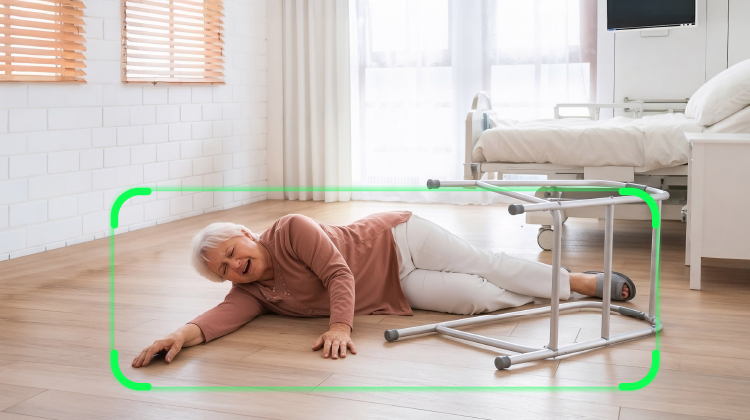
- Fall/Bed Egress Detection: The system autonomously monitors patient movements to alert staff immediately to potential incidents. This is crucial, as rapid intervention after a fall is vital in preventing complications like pressure sores, dehydration, or pneumonia that can result from prolonged time spent on the floor.
- Reduced Alarm Fatigue: By distinguishing routine motion from actual critical incidents, real-time video monitoring reduces irrelevant alerts and reduces the cognitive load so nurses can focus on genuine events.
- Event Records: The system automatically logs critical occurrences, such as fall and bed exit detection records. These logs provide concrete data, significantly assisting with quality management and medical safety audits.
Optimized Clinical Interaction
AI features also streamline clinical observation and protect patient dignity:
- Face Tracking/Better Framing: During remote consultations, the camera automatically detects, zooms in on, and centers the patient’s face (or the area of interest) in the frame. This improves physician observation efficiency by ensuring a strong visual connection and eliminating the need for staff to manually adjust the camera.
- Privacy Protection Mode: With the mosaic function applied to individual faces or full bodies within an image, patient privacy is effectively protected. This is particularly useful in restricted settings, such as operating theaters, where anonymity is required.
Certification and Integration
While advanced technology and streamlined workflows are critical, hospital use requires strict safety and compliance. For instance, UV disinfection support ensures the MD720UIS can be thoroughly sanitized, aligning with demanding infection control protocols and lowering the risk of healthcare-associated infections (HAIs).
Equally important is medical-grade EMI shielding. This protection prevents the device from interfering with sensitive medical equipment, such as monitors or imaging tools. “This isn’t just about regulatory compliance but patient safety and technology you can trust,” Owen notes.
Furthermore, with Zoom certification, the MD720UIS slots right into the Zoom workflows clinical staff already use for consultation scheduling, one-click joining, and content sharing. This means no additional training is required and quicker adoption.
Pro Tips on Investing in Telehealth
Given the complexity and speed of change in healthcare technology, hospital decision-makers need a strategic roadmap for expanding their remote care systems. Owen offers some guidance that goes beyond the price tag:
- Inventory the Needs: Clearly define the image, audio, AI, permissions, and record levels required for specific clinical scenarios, such as consultation, chronic disease management, and rehabilitation.
- Evaluate Scalability: Confirm that the device supports the future addition of apps, AI modules, and API connections to hospital systems, such as Health Information System (HIS), Electronic Medical Records (EMR), and nurse call systems.
- Total Cost of Ownership: Look beyond the hardware price to include deployment time, staff training, maintenance, and the update cycle.
- Security and Compliance: Assess the scope of data processing, whether images are pre-processed on the device, transmission encryption, and audit logging capabilities.
- Infection Control and Durability: Consider the material, cleaning frequency, EMI compatibility, and the strategy for long-term service life and spare parts.
- User Experience: Conduct clinical field trials (PoCs) to gather feedback from nurses, specialists, and IT personnel before committing to a wide-scale deployment.
- Supply and Services: Ensure there is Firmware long-term support (LTS), defined Service Level Agreements (SLAs), and tools for remote monitoring and diagnostics to guarantee stable operation after deployment.
All in all, Owen concludes, “Invest in a system that not only meets your needs today but also gives you a scalable platform for your future telehealth strategy. It’s all about creating a genuinely connected and easy experience for everyone involved.”