The AVer HUB30 and HUB35-EXT35 4K BYOM Matrix Switchers resolve common hybrid meeting issues like cable clutter and complex setups by offering a centralized, plug-and-play architecture. Both feature dual 4K output and use a single USB-C connection for 4K video, audio, and power. The HUB30 is for small to mid-sized rooms, while the HUB35-EXT35 extends 4K USB up to 100 meters for extra-large spaces, ensuring reliable, scalable conferencing with seamless, AI-powered switching for AVer cameras.
The shift toward Bring Your Own Meeting (BYOM) spaces often introduces unwanted complexity. Few experiences are as frustrating as walking into a meeting room and encountering tangled cables, grappling with poor video, or struggling with unstable connection issues that consume valuable scheduled time.
This daily struggle not only wastes minutes but also significantly degrades the overall professional meeting experience. The initial promise of BYOM flexibility is quickly overshadowed by practical operational hurdles.
Friction Points in BYOM Environments
It’s more than just messy wires. According to Kiki Xing, a Product Manager at AVer’s Pro AV Product Unit, key pain points when implementing a BYOM solution include compatibility issues across platforms like Zoom and Teams, a complex setup process requiring manual switching, unstable audio-video quality due to network issues, and a lack of distributed control for managing AV and content sharing.
AVer’s 4K BYOM Matrix Switchers were designed to remove these hurdles and refine hybrid meeting environments. While IT teams rightly focus on security, management, and training, the HUB series complements those priorities with a centralized, plug-and-play architecture.
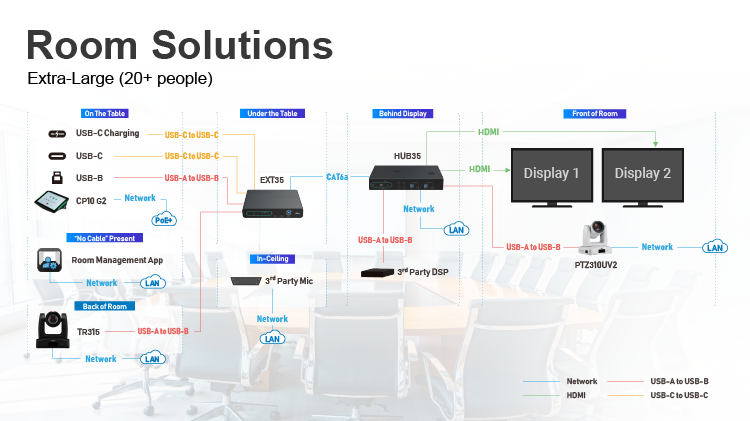
Translating that approach into practical room solutions, the HUB30 is a matrix box for small to medium-sized conferencing rooms, supporting up to four different inputs, while the HUB35-EXT35 goes further, adding a transmitter and a receiver, five different inputs, and supporting USB 3.0 extension up to 100 meters in large and extra-large spaces.
Centralizing the Collaboration Experience
One Cable that Commands Attention: USB-C
At the core of the HUB Series’ simplicity is the efficiency of USB-C. A single cable manages 4K video and audio while also supplying up to 100W Power Delivery (PD).
Kiki elaborates on the design: “We recognized that BYOM’s biggest hurdle wasn’t the technology itself, but the user experience. Our goal with the HUB series was to reduce meeting setup to a single, secure USB-C connection that handles everything. Otherwise, it would require separate USB and HDMI connections, as well as an additional power adapter, which makes cable management and maintenance a lot more challenging. So we wanted all three in one robust connection.”
‘Seeing Double’: Dual 4K Output
The ability to send output to dual 4K displays is a significant feature, allowing users to show content on one screen and meeting participants on the other, which provides a more comprehensive view for all meeting participants.
“Dual 4K output is a must-have for serious professional spaces,” Kiki notes. “The HUB system supports single-duplicate, single-extend, and two-source modes. We also fully support video scaling across these modes.”
Redundancy and Signal Assurance
AVer’s HUB Series supports a wide variety of devices with inputs for USB-C, HDMI, and DisplayPort. Beyond physical inputs, the system offers robust protection against failures. AVer offers a software-based solution against connection failures and ensures meeting continuity.
“We provide free-of-charge Room Management software to enable wireless connections as a redundancy for wired connections, which acts as an immediate failover if a hardwire link drops,” says Kiki.
Tailoring the HUB to Your Meeting Space
AVer HUB30: Mid-to-Large Rooms
The HUB30 is a standalone matrix box designed for plug-and-play ease. For optimal 4K performance, Kiki advises: “Be sure that your input and output devices, as well as the USB 3.0 cable for the connected 4K AV peripherals, all support 4K60. But this requirement doesn’t depend that much on the cables themselves — it’s about the quality of the devices.”
The EXT35 unit enables the necessary 4K USB extension over long runs. Cable ranges are shown below:
| Cable Range Specifications |
| Cable Type |
Link Rate |
Range - Typical |
| Cat6 (UTP) |
6 Gbps symmetrical |
70 meters (straight)
70 meters (with patches)
|
Ecosystem of Intelligent Control
A key advantage for the HUB Series is its deep, intelligent integration with AVer’s ecosystem of cameras and software.
Smart AI Camera Switching
The HUB Series’ native integration with AVer cameras enables seamless switching between two cameras. Here, the AI uses a combination of cues — face detection and motion tracking — to smoothly transition views.
“Camera switching is automatically based on the use case,” Kiki explains. “Our goal with the switching is precision and smoothness. The system’s responsiveness is entirely configurable. You only need to set up two cameras, assign their locations, and stipulate the desired zones. The AI then handles the rest to ensure the focus is on the content and the people.”
Kiki adds, “What’s more, we’re also planning new features that prioritize the camera based on the presenter’s frontal face view, essentially treating the presenter as the anchor for the meeting. This enhancement is expected to be released in H1 2026.”
CP10 G2 Touch Panel
The optional AVer CP10 G2 Touch Panel streamlines operation by letting users select sources and control cameras without complex programming. Its default settings meet common needs immediately, and lockout features can be preset to prevent accidental changes during a live session.
“Because the HUB Series ships pre-integrated with AVer audio and video systems, no extra programming is required,” says Kiki. “This makes deployment simpler and reduces the time IT teams spend on initial setup.”
Future-Proof ROI
The AVer HUB series successfully combines high-performance 4K video quality, fast device charging, centralized control, and room scalability into a single, dependable system for BYOM deployment.
- Installation Versatility: Both units support various professional installation methods, including rack-mounted, under-the-table, inside a podium, or behind the display, allowing integrators to select the optimal placement for cable management and aesthetics.
- Predictable ROI: “The greatest value we deliver is in reducing friction points,” Kiki states. “Our integrator customers tell us they see a clear reduction in IT support tickets related to AV setup and a strong increase in user satisfaction. That is a real return on investment.”
AVer provides specialized training and recommended bundles to guarantee success during deployment. Users can explore the HUB Series and review the YouTube training video for guidance on upgrading their organization’s meeting spaces.